
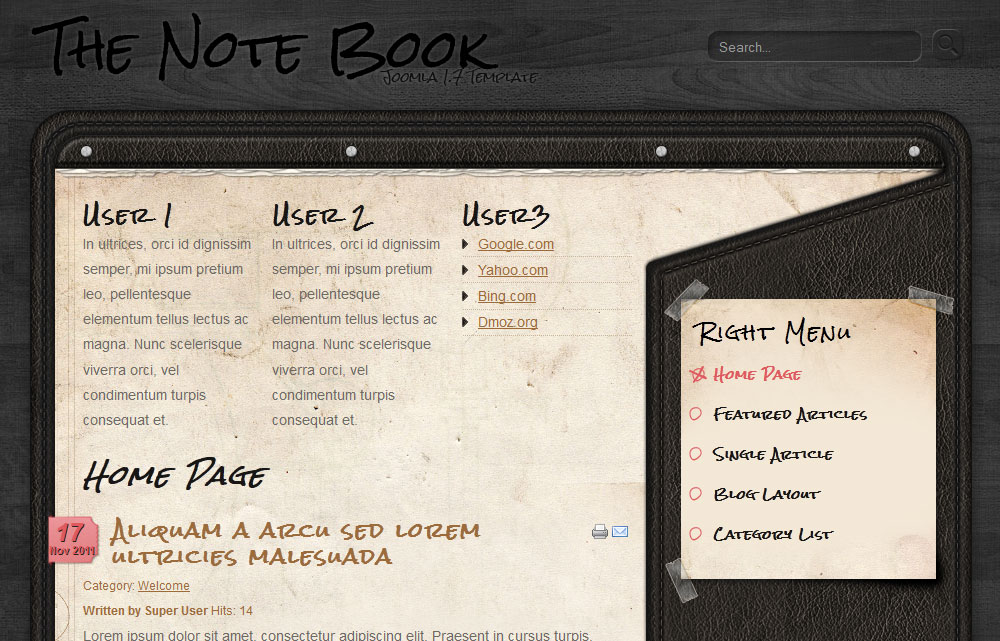
We tried to create a Joomla 1.7 template for bloggers. The Notebook template has an iPad inspired design, with some really nice textures and colors. We believe that most of the bloggers are not using slideshows on their blogs, this is why the slideshow module is missing here. If you would like to use a slideshow, I recommend placing it on module position ‘user1′. You can download our NivoSlider for Joomla 1.7 module for this reason.
As our other templates, The Notebook theme is also very flexible, having lots of module positions, the css is easy to customize and transform it that suits your needs. The logo image can be changed easily, uploading and overwriting the logo.png file into the template folder or placing a custom module with your own image on the position ‘logo’.
If you find a bug or you have any questions regarding this template, or just want to say hello, feel free to post a comment bellow.

vorrei provare il vostro template..sembra interessante =)
Good template for blog
is possible the download for my blog??
Yes, of course
You can freely use our templates for all your projects – non-commercial and commercial ones…
I suggest adding a “google+” button for the blog!
Hellen
Hellen, thanks for your suggestion, we will consider adding G+ and other buttons as well.
Hi! Nice Template! How to add the date icon? Thx a lot!
Go to the menu that is linking to your blog or article layout. In the Article Options tab change the Show Publish Date to Show
or you can use the Global configuration, but you will have to set up everything in the Content > Article Manager > Options
Hope this helps. If not, just let me know and will upload a tutorial with some nice pictures.
Hi there,
i set up as described, but no success
I see you have fixed this issue. Hope you like our template
I install template, but no modules there..
. where i can download quicstart maybe?
Sorry, but we do not provide quick start for our templates. You have to create and publish the modules yourself.
Ok got it. Another question. When i click onnews and it opens – data logo appears, but not data logo (light red) when main page is loaded.
and cant understand how to create search avaible.. I find how to make modules but not search..
Just create simple search module and place it on the module position ‘search’.
Hi, thanks for this template. I like it a lot. Though, I can’t seem to find the module position ‘search’ although it’s in the CSS. I’m using Joomla 1.7.
When you want to publish a module on a custom position, that is not in the list, you can simple click on the position input and enter the position name you want. Check out this picture:

I like everything about the look. I would like to change the color of the notebook. Is that possible?
We do not provide the PSD design. Sure you can change the background and redesign it as you want. If you need customization of our templates, please contact us via the contact form, tell us what you need and we will get back to you with a quotation.
IE9 destroys the whole format…
Hello, we will try to fix the IE9 bug and will update the template as soon as possible.
Hi,
I’m facing the same problem – the template doesn’t display correctly in different versions of IE on certain PCs – mostly IE9 but also some older versions like IE6. Have you found & fixed the “IE bug” yet?
Thanks,
Zdenek
Hello Zdenek, could you send me a screenshot?
Hi,
I have the screenshots but don’t know your email address…
Zdenek
If you can, please help me a bit
So I can install this template on localhost but I can’t on web server. Joomla simply don’t give any message after I upload and install package and there is no template to be found. What can be cause? I even tried re-installing whole Joomla but still I don’t get any message when I install Notebook while on localhost server it works like a charm. Thanks and that template is so amazing, just what I was looking for for my non-commercial site. Good Job
I don’t know what could be the problem but here are some suggestions:
1. Check if the /tmp and /templates folder are writable and if has the right permission.
2. You have to install the template via Joomla backend; uploading the template via FTP does not work anymore for Joomla 1.7.x version
3. Always use ZIP files and no RAR.
If you still have problems just let me know.
Thank you for your fast respond.
Well I was trying to figure this out whole night and I couldn’t. Worst thing is there is nothing on Google about this weird problem.
1. They are, I tried to install some other templates and it went fine without problem.
2. I do via backend (Extension Manager > Upload & Install form)
3. I use original ZIP that I got from this site which is properly packed in for install cause I installed it on Localhost.
Basically localhost Joomla ver. is same as my server one it’s all same and yet I can’t install. It uploads file and after that I don’t get message that installation went fine nor that it had errors, simply – nothing.
Anyway thanks, let me know if you think of anything else and again, amazing template, gj.
I tried other browser as well even tho that didn’t make much sense but nothing. Only thing I can think of is that my host (000webhost) isn’t doing something right for some reason. This is not first time this happens tho. Anyway, link of my website which you can see as Admin is link for website I’m trying to install this template to, as you can see I managed to install other template fine but not this. If you have any suggestion or another solution suggestion, please let me know. I really like this template and I was LF one notepad template like a night before I reached this page and from the moment I saw it I liked it. It will be quite good with a programmer’s website, non-commercial
Usually free hosts has a limitation on file size. On the Free plan 000WebHost may have the same limitation. This template has over 2 MB and your host does not allow you to upload the file.
Contact the support of your host to increase the file size or try to hack the database and upload the template via FTP.
If you may need a paid hosting in the future, just contact me, I can recommend few Joomla hosting companies.
Hey man. It was 5MB limit but it was bugged somehow, I just installed it over FTP normally. Thanks so much for your support. Keep up amazing work!
But theres no search position in your template.. theres only default search position, from default joomla..
The ‘search’ position is at the top right. Check out the online demo, you can see it in action. Maybe I do not understand what you really want…
Hi there! I love this template. I used this for our project. But I can’t understand why the menus(on the right) are missing whenever I open it or try to edit. Do you know why and how? I tried to add a menu but still it doesn’t work. Please help me. Thank you!
Can you explain me in more detail what is the problem with the right menu?
I don´t create right..help me, thx
Maybe you missed something, like wrong module position or the module is not active or any other minor issue that may cause this problem. If you do everything right, it have to work.
Nice looking template but I am running into the same install error as a previous commenter. Each time I try to install from the back end I get “There was an error uploading this file to the server” My hosting is paid on Go Daddy so I am sure I have enough upload ability… any thoughts?? Thanks in advance.
“There was an error uploading this file to the server” – it means that the system can not upload the file to your server. The template has over 2MB size, this may cause this error in many cases. If your server allows to upload bigger files, then it can be a problem with the folder permission.
Try to upload the file via FTP and install the template from local folder. If this does not work, contact the support at Godaddy.
Thanks for such a fast reply. I am going to FTP it in instead. As I have not had to do that before with a template, am I correct to assume it’s just a matter of unzipping and putting all the unzipped files in the templates folder (under a folder named notebook) on the root?
Got it!
Love your template! Thank you very much! I have one problem… when I insert the “read more link”, the right sidebar colapses…how can I fix that? Please, help…
Excellent template. What font do you use for your title?
We use Rock Salt font, form Google Font Directory.
I love this template and plan to use it for some of my clients. The only problem? When I go to install it from the Joomla back-end, it says there is no Joomla! XML setup file in the package. How do I get it to upload?
Thanks,
Steve Daniels
Actually, after reading more of the replies and comments, I think I’ve got it. Thanks!
Never mind, it didn’t work. Help?
What Joomla version are you using? This template works only with 1.6, 1.7 and 2.5.
Ah. I’m on 1.5 Nevermind.