
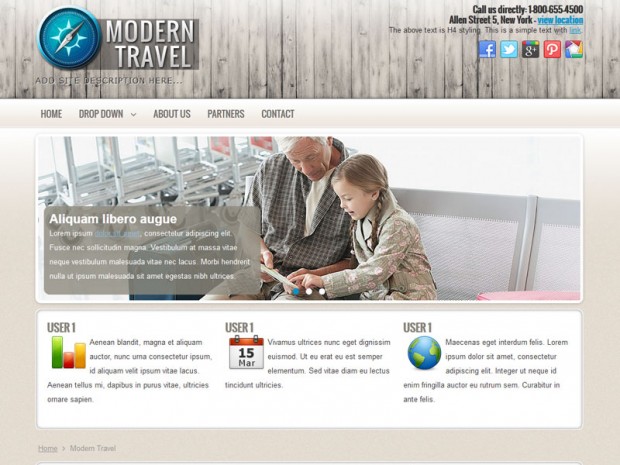
With the power of Joomla 1.7 and our travel template, you can create a simple, easy to manage and update website. This template comes with all the features that a travel website may need: slideshow where you can display beautiful images, drop down menu with 3rd level navigation, multiple module positions where you can place news, advertizments, custom texts, menus, random images, twitter and rss feeds, etc.

how to download this template?
You have to accept the terms, by clicking on the checkbox. Once you have clicked the checkboxx, the download button will be activated.
How do I change the logo and where would I find a forum addressing other questions of this template?
Hi, I see you have changed the logo already. For those who may not know how to do this I will explain:
The logo can be changed in the administration panel very easily.
1. Go to Extensions>Template Manager>Styles
2. Choose the Modern Travel style
3. Change the logo (you can upload your own image logo or use a text logo)
Hope this helps!
We do not have any forum and don’t plan to use one in the future, but you can ask anything regarding this template, or any other Joomla issues here. We will try to help you.
Hello, I have problem with diacritic letters. They appear small than the other letters..
Do you have problems with diacritics in the headings or in content? Maybe the heading font family does not support diacritics…Try to change the font family via css and check out if with Arial it works well or not.
Hi, I love that template !
I would like to add some stuff on the right side of the slideshow. How do I do that ?
Do i need to change the css and add float left ?
I also would like to reduce the margin between the content and the right .
If you want to do the things you have mentioned above, you have to do some css changes and also you have to add a new module position in the index.php file. We will make a tutorial on this in the future.
Hi,
I just want to know how we can build the slideshow? And the size of the pictures.
Thanks for your help, your work and for your template!!
seb
The size of the pictures in the Modern Travel slideshow are: 960px × 290px
You can build easily the slideshow, by downloading our slideshow module for Joomla 1.7 http://newjoomlatemplates.com/nivoslider
Hi!
Great looking template!!
Is there a way to add a search field?
Hello, thanks for the compliment, I’m glad to hear that our templates are useful and more and more users are using them.
This template do not have a dedicated search field, but you can easily add one in the header area by using the following codes:
Edit index.php and insert the code between following div tags:
Edit styles.css and insert the following styles for the search field:
Hi,
i am so glad that you guy’s are doing these Joomla! extensions and templates for free. I am hosting and playing with the templates from my localhost on my laptop and I admire the effort that you are putting into these projects.
I tryed to find free websites that are well done and good looking but to be honest I have’nt seen any real power like the sites that are made here.
Just so glad for Open Source developers, that are willing to take the time to work on these wonderful projects and share their work to other people.
Looking forward for any work that you do.
Thumbs up.
Hello Mike, thank you very much for your positive feedback. The plan was to help other users, and I’m happy to see our site useful to others.
First, I would like to say thank you to your entire team for loading such quality templates for free. You don’t see that much on the net. I truly love the look of your templates. I am new too Joomla and seem to be making my way around pretty good. HOwever, I have chosen the Modern Travel template and I am having a bit of trouble loading the slide show graphics. I tried the instructions I saw on a previous post, but the criteria doesn’t seem to match my Module Manager. Are there any other instructions or perhaps another upload method?
Once again, thank you for the great templates.
First of all thanks for your positive feedback.
To create the slideshow, please install this module: http://newjoomlatemplates.com/nivoslider
After installation set it up, choosing the right folder and set up the size of the images. Publish the module on the position ‘slideshow’ and assign it to the menu points where you want to display it.